

• Skip to primary navigation
  • Skip to main content
321 Web Marketing logo dark
321 Web Marketing logo light

321 Web Marketing

Inbound Lead Generation Company

  • Inbound Lead Strategy
    • AI Marketing
    • Search Engine Optimization
    • Generative Engine Optimization
    • Google Ads Management
    • WordPress Optimization
    • Content Marketing
    • Lead Generation
    • Website Development

    Would you like a free market research workshop?

    Schedule Conversation

    Ready To Turn Website Traffic Into Real Leads?

    Explore the inbound marketing services that drive measurable results.

    Build Your Lead Pipeline
  • 321 Software
    • 321leadtracker.io
    • Content Portal
    • Real-Time Metrics
    • 321 WordPress Tools

    Would you like a free market research workshop?

    Schedule Conversation

    View Our Past, To See Your Future.

    Explore the strategies, websites, and systems we’ve built for clients across industries.

    View Portfolio
  • Free Tools
    • ROAS Calculator
    • Lead Gen Benchmarks
    • Website Checklist

    Would you like a free market research workshop?

    Schedule Conversation

    Real Campaigns. Real Results.

    See how we’ve helped real clients increase visibility, lower cost-per-lead, and generate consistent inbound leads.

    Explore Case Studies
  • Industries

    • Contractors
    • Cybersecurity
    • Insurance
    • IT
    • Healthcare
    • Legal
  • Who We Are

    • About
      • Awards
      • Portfolio
      • Community
      • Careers
      • Case Studies
      • Team
    • Blog
      • Articles
      • Guides
      • News

    Would you like a free market research workshop?

    Schedule Conversation
Free Consultation
Home › Blog › Digital Marketing ›

How To Create A Google Account Using An Existing Email Address

Elijah Millard Headshot

Elijah Millard

Principal, Digital Marketing

Elijah leads the marketing department, organizing and implementing creative and innovative digital marketing campaigns with a background in mass communications & psychology.

Table of Contents

  1. 1. Step 1: Open The Google Account Creation Page
  2. 2. Step 2: Select “For my personal use”
  3. 3. Step 3: Click “Use your existing email”
  4. 4. Step 4: Complete The Registration Form
  5. 5. Step 5: Verify Your Email
  6. 6. Step 6: Finish Setting Up Your Account
  7. 7. What To Do If Your Email Is Already Linked To Google
  8. 8. You're Done!

Share this post

Copy to clipboard
321 Web Marketing logo 2025

Ready to Drive Real Growth?

Stop guessing and start generating real results. Let’s talk about what growth could look like for your business.

Get Started Today

Calendar icon Jul 30, 2025 · Clock icon 3 min read · ChatGPT logo Summarize in ChatGPT

Creating a Google Account doesn’t mean you need a Gmail address. If you’d prefer to use your current work or personal email, you can as Google allows you to set up an account with any email address you already own.

Follow the step-by-step instructions below to create your account and access all Google services using your existing email.

Step 1: Open The Google Account Creation Page

Go to https://accounts.google.com/signup.


If you’re already signed in, click your profile icon in the top right and either sign out or switch to a Guest or Incognito browser window before proceeding.

Step 2: Select “For my personal use”

When asked how you want to use the account, choose the “For my personal use” option. Avoid the business option unless your organization uses Google Workspace.
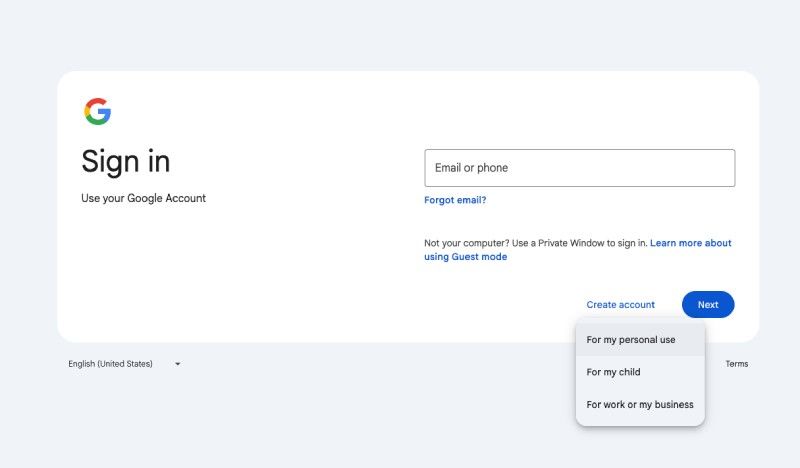
Step 1 Creating Google Account With Existing Email

Step 3: Click “Use your existing email”

Instead of creating a new Gmail address, click the link that says “Use your existing email address.” This lets you sign up with a non-Google email like your work or personal domain.
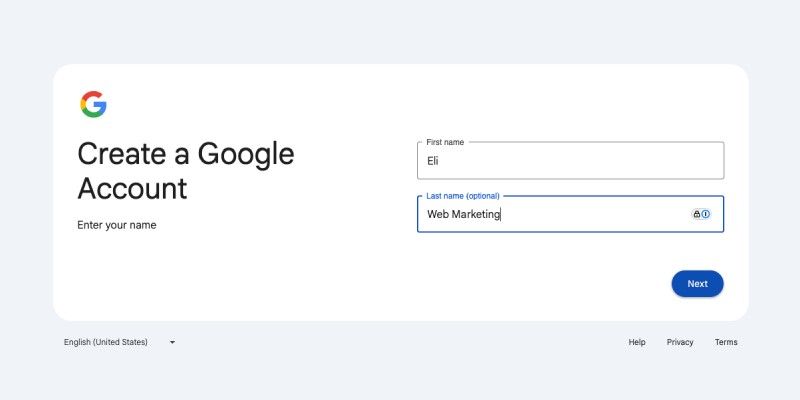
Step 2 Creating Google Account Using Existing Email

Step 4: Complete The Registration Form

Fill in your name, the email you want to associate with your Google account, a password, and your birthday and gender. Click Next.
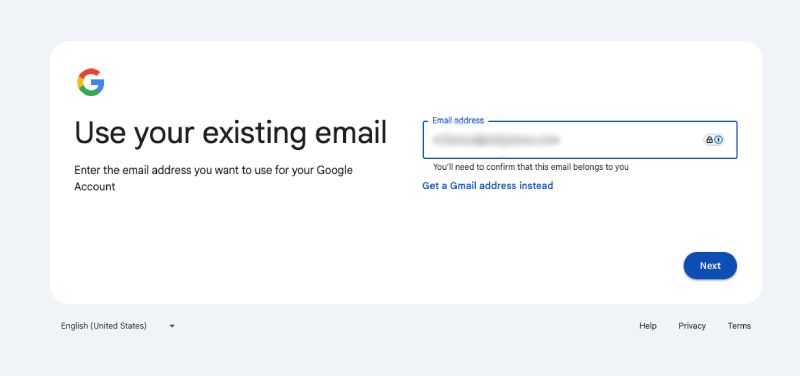
Step 3 Creating Google Account Using Existing Email

Step 5: Verify Your Email

Google will send a confirmation code to the email address you provided. Open your inbox, grab the code, and enter it on the screen.
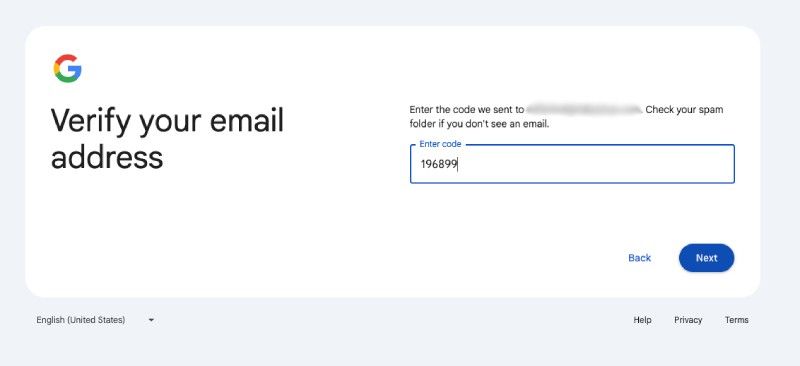
Step 4 Creating Google Account Using Existing Email

Step 6: Finish Setting Up Your Account

After verifying your email, Google may ask for additional information like a phone number or recovery email. You’ll then be asked to agree to Google’s terms and privacy policy.
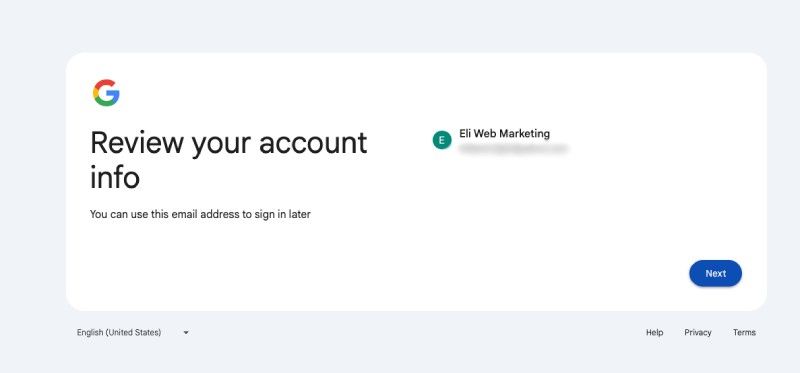
Step 5 Creating Google Account Using Existing Email

What To Do If Your Email Is Already Linked To Google

If you receive a message saying your email is already in use, try signing in at https://accounts.google.com and use the Forgot Password option. You likely created a Google Account with that email in the past.

You’re Done!

You now have full access to Google services (Calendar, Docs, YouTube, Analytics, and more) without needing a Gmail address.
Elijah Millard Headshot

Elijah Millard

Principal, Digital Marketing

Elijah leads the marketing department, organizing and implementing creative and innovative digital marketing campaigns with a background in mass communications & psychology.

321 Web Marketing logo circle new

About 321 Web Marketing

Inbound Lead Generation Company

We provide expert national SEO services to help businesses rank for lead-generating search terms on the front page of Google.

Share this post

Copy to clipboard

What Our Clients Are Saying About Us

OFP LAW logo

Kim Greer

OFP Law

One of the best business decisions I ever made was to contract with 321 Web Marketing. Jonathan Gessert and his team are knowledgeable, efficient, and effective, making digital marketing goals easy to achieve and helping [...]

Business Benefits group logo

Kelly Cole

Business Benefits Group

My company hired 321 Web Marketing in February 2016 to resurrect our web site. We feel our web site is the face to our business and desperately needed a make over. 321 took us from blah to WOW effortlessly and what a difference [...]

Diener & Associates Logo

Emily Hawkins

Diener & Associates

Thanks to 321 Web Marketing, the client has seen an increase in their search engine leads, averaging 12 qualified leads per month. The client has also achieved prominent Google Maps and search placement. The team manages the engagement [...]

Paw Pals Pet Sitting Logo

Trevor Telesz

Paw Pals Pet Sitting

321 Web Marketing successfully translated the client’s design into a stunning and refreshed website, ensuring seamless functionality across all dynamic views. The team provided clear timelines and stuck to them, keeping everything [...]

Spartan Animal & Pest Control Logo

Corey Davis

Spartan Animal & Pest Control

321 Web Marketing is truly phenomenal at what they do. Their ability to communicate and describe the steps and actions that they are implementing , Alex Zarpas in particular, is excellent. Delivering on promises is all they have done for me [...]

MFE Insurance Logo

Alec Roberts

MFE Insurance

I can’t say it enough, Jonathan and his team have gone above and beyond since day one to accommodate our needs and meet our goals. I run a specialty insurance brokerage based in LA and once we found 321 we never looked [...]

Advantage Tech Logo

Richard Wilbur III

Advantage.Tech

Thanks to 321 Web Marketing’s web development work, the client increased rankings and traffic from search engines. Also, their business secured prominent positions on Google Maps and industry-relevant, profitable keywords. The client also [...]

FVCBank logo

Bruce Gemmill

FVCbank

After the website revamp, the client saw a steady rise in leads from search engines, resulting in additional traffic. 321 Web Marketing is highly punctual when it comes to deliverables, and internal stakeholders are impressed with the service [...]

VAE Logo

Drew Weeks

VAE

321 Web Marketing delivered a sleek website that accurately portrays the size and quality of the client’s organization. All of their completed websites have received positive feedback from users who have been impressed by the UX/UI. The [...]

Masten Pools Logo

Ryan Masten

Masten Pools

321 Web Marketing has increased the client’s leads from zero to 53 monthly. Their SEO efforts pay off impressively due to a top-ranking position on Google and making the site the number one result for several local service keywords. The [...]

Previous
Next

Related Articles

Feb 16, 2026 · 7 min read

google ai app logo rendered dark gray background white rounded square around

Where and Why Google’s AI Overviews Appear

Learn how Google’s AI Overviews are triggered in search results and what determines their impact on SEO and engagement. Read More

google ai app logo rendered dark gray background white rounded square around

Where and Why Google’s AI Overviews Appear

Feb 9, 2026 · 7 min read

seo search bar with growth charts

How to Perform AIO Research Using Moz

When Google rolled out the AI overview to the public in 2024, website owners/managers feared its potential impact on organic CTRs. Read More

Elijah Millard Headshot

Elijah Millard

Feb 4, 2026 · 40 min read

Marketing department growth meeting

How to Build a Marketing Department That Actually Drives Growth

Take control of your marketing strategy. Learn how to recruit, organize, and lead a growth-focused marketing department that drives bottom-line results. Read More

Anthony Andreatos

Anthony Andreatos

Clutch Top 1000 Companies 2024 Award
Clutch Top Technical SEO 2024 Badge
Google Partner logo

Recognized For Results, Backed By Data

We believe marketing should be measured by performance, not promises.

Schedule Meeting
321 Web Marketing logo light

Virginia Office
1900 Reston Metro Plaza
Suite 600
Reston, VA 20190

Maryland Office
1209 North East St
Ste A #250
Frederick, MD 21701


Contact Us

Link to company Facebook page

Link to company LinkedIn page

Link to company Instagram page

  • Inbound Lead Strategy
    • AI Marketing
    • SEO (Search Engine Optimization)
    • GEO (Generative Engine Optimization)
    • Google Ads
    • WordPress Optimization
    • Content Marketing
    • Lead Generation
    • Website Development
  • 321 Software
    • 321leadtracker.io
    • Content Portal
    • Real-Time Metrics
    • 321 WordPress Tools
  • Free Tools
    • ROAS Calculator
    • Lead Gen Benchmarks
    • Website Checklist
  • Industries

    • Contractors
    • Cybersecurity
    • Insurance
    • IT
    • Healthcare
    • Legal
  • About
    • Our Process
    • Awards
    • Portfolio
    • Community
    • Careers
    • Case Studies
    • Team
  • Blog
    • Articles
    • Guides
    • News

Copyright © 2026 321 Web Marketing·All Rights Reserved·Privacy Policy·Terms of Use·Client Login