




 Sep 13, 2021 ·
  9 min read ·
  Summarize in ChatGPT
Businesses often invest a lot of time and money into creating informative and engaging content for their blogs. However, even the best blog posts can become outdated over time.
Updating blog content can have many benefits for businesses, such as an improvement in click-through rate, greater accuracy of content, removal of broken links, the addition of newer resources and the insertion of multimedia to achieve better rankings. Updating an old blog post can also improve how often Google indexes the site and gives businesses the chance to implement the right keywords to help amplify their marketing SEO services.
Tips To Update Old Blog Posts For SEO
Blog posts can differ significantly from website to website. Some posts are more in-depth than others, more shareable and create a higher conversion rate. Some blogs are also more effective at resonating with readers which is evident through the better time on-page metrics and bounce rate. It is not necessary to treat all blog posts equally but instead, plan strategically to help update each old post for SEO.
The following tips can help businesses update their old blog posts and boost their SEO marketing campaign:
1. Identify Top-Performing Blog Posts
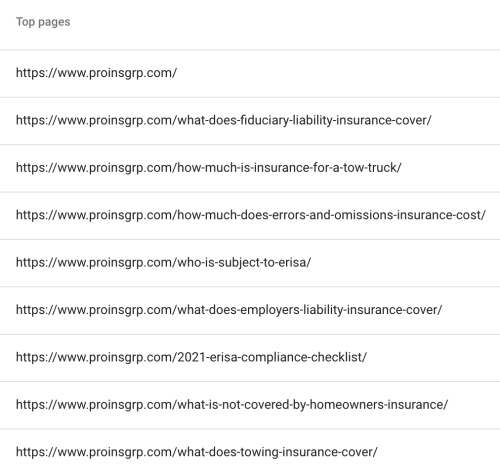 Figure 1.1
Start the process of updating old blog posts by identifying which posts are the top performers. Analytics are useful for comparing metrics like traffic, inbound links, social shares and keywords. Implement keywords that the business is trying to rank better in the search rankings for into the existing content. Use online tools like Google Analytics or other keyword tools to identify the best keyword ranking opportunities.
Figure 1.1 shows the top performing pages for one of 321 Web Marketing clients, Pro Insurance Group, on August 16th 2021. By using Google Seach Console, our SEO marketers are able to see which blog are receiving the most impressions and clicks.
2. Find Keywords That The Post Already Ranks For
Some old blog posts may already be ranking in the search engines for certain keywords. Look for keywords that are ranking on Google’s first or second page, ideally positions one through 20 in the SERPs. There are several ways to accomplish this, such as through the use of Google Search Console. Google Search Console allows users to look at target keywords, volume and position data.
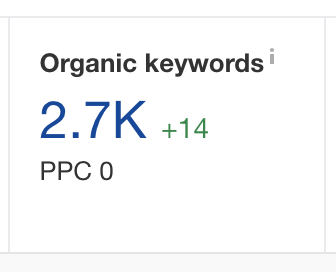 Figure 2.1
Businesses can also determine what keywords their blog posts are ranking for with the use of online SEO tools. Ahrefs is one such keyword tool that enables users to determine how a keyword ranks by copying and pasting the URL of the blog post into the platform. The website will create a list of organic keywords that the post currently ranks for, as well as volume and position information.
Figure 2.1 displays the number of organic keywords our client, KPPB Law, is ranking for in Google. From this list, we are able to identify which keywords their blog posts are already ranking for and which keywords can still be captured or improved in rankings.
3. Choose A Main And Secondary Keywords
Optimizing old blog posts require businesses to consider where improvements can be made in terms of SEO marketing. Select both a main keyword as well as one or two secondary keywords. The main target keyword chosen should match the search intent for that keyword. Perform a quick search for the target keyword and make sure that the results on the first page are similar to the blog post content.
Next, consider if the blog post currently ranks in the top five results for any particular keyword. If it does, look for a keyword with a good volume that is also ranking in one of the top five positions in the SERPs. Adding this new keyword to the post could help it rise to the top of the search results. In some cases, a lower-ranked keyword may be better to target if the blog post currently ranks high for a keyword with minimum search volume.
4. Take Notice Of Trending Topics
Although metrics play an important role in deciding which old blog posts to update, they are not the only aspect that businesses should review. Consider updating blog posts based on trending topics. If there is a lot of buzz about a particular topic that the blog has already covered, updating it for SEO is often a better option than publishing a new post that Google could mark as duplicate content. Keep up with the latest trends and leverage existing posts when the opportunity arises.
5. Update Content For Accuracy
Accuracy is crucial when posting any type of content online on behalf of the business. When content contains grammar or spelling mistakes, or information that has been deemed false, it can reflect poorly on the company. When updating old blog posts, take the time to review the content for accuracy.
Start by removing content that is no longer relevant or provides no value to readers. Replace outdated statistics or data with more current information or resources. If the content contains screenshots, consider updating the photos if steps have changed. Replace internal links if better resources now exist and update the post’s call-to-action (CTA) to a more creative prompt that is more likely to encourage visitors to take action.
6. Do Not Update The URL
Unless absolutely necessary, do not change or update the URL of the existing blog post. An established URL can help the post continue to rank for certain keywords which help businesses save time in their SEO marketing quest. If a URL must be changed due to a modification in the title, redirect the old URL to the new one. A redirect will help keep some of the link value.
7. Track Performance Before And After
It can be hard to determine if updating a blog post is really effective without measuring the performance both before and after the changes have been implemented. When republishing content, write down the post’s title, URL, and the before and after publishing dates, number of comments, inbound links, social shares, post views, new leads and keyword rankings. These comparisons can tell businesses a lot about what posts have been successfully updated and which still need work.
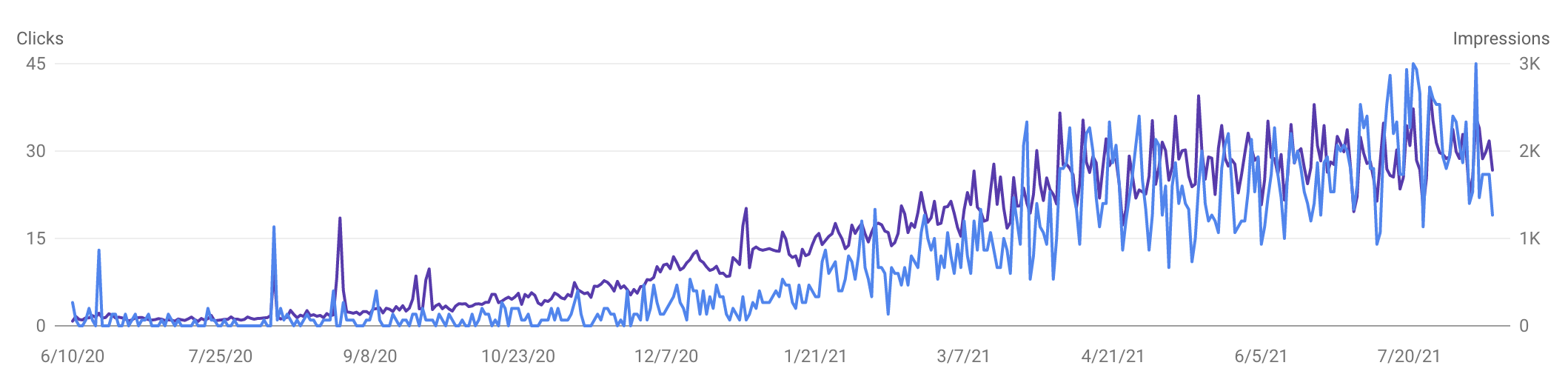 Figure 7.1
Figure 7.1 shows the number of clicks and impressions going up over time for our client, The Law Office Of Kermit A. Monge, using Google Search Console. By keeping track of the numbers before and after updating blog content, you can understand whether your SEO efforts are working and make adjustments if needed.
8. Request The Updated Post Be Reindexed
Google will ultimately discover the updated blog post on its own and reindex the new page. However, this can take hours, days or even weeks. Businesses can speed up this process by requesting that Google reindex the updated blog post. To request that a blog post be reindexed by Google, paste the URL of the updated post into the search bar of Google Search Console and click the button that says “Request Indexing.”
How To Promote An Updated Blog Post
Once a business successfully updates an old blog post for SEO, it must be promoted to reach the target audience. There are several ways that updated blog posts can be promoted to reach a wide range of channels, including search, email, social and others.
Share on Social Media
 Social media is one of the best ways to share new and updated content. Facebook, Twitter, LinkedIn and other platforms contain millions of users that may read and share the content with others. Businesses can also use tools like Buzzsumo to look up the top shares of the original post.
Leverage Email Marketing
Email continues to play a crucial role in online marketing. This low-data, high-engagement marketing strategy allows readers to click on a link found in an email to read the updated blog post in its entirety. Use engaging words in the email subject line to draw in readers.
Request Backlinks Be Updated
There may be articles on the web that had previously linked to the original blog post. After updating the old post, reach out to these websites and request that they update the link with the new URL. If the URL has not changed, simply notify the website that the post has been updated. The website may choose to cover it again to include the updated information.
Seek New Backlink Opportunities
Updating an existing blog post that has shown ongoing success creates an opportunity to reach out to websites and ask that the link be added to the site. Opt for popular websites that receive a high amount of traffic and are relevant to the blog post.
Why Update Instead Of Write From Scratch?
Some businesses may contemplate updating their old blog posts and may consider writing new posts on the same topics from scratch instead. This route can create duplicate content on the web which is highly frowned upon by search engines. Creating new content from scratch is also a major time and financial investment. There are many reasons why updating old blog posts is so effective.
Since the original blog post has already been created, businesses have a version that they can work off of to improve and optimize. Most of the research has already been completed, making it faster to update and publish an existing post. Updated blog posts also tend to be of higher quality as they tend to dive deeper into the topic. They may also be easier to promote because businesses already know who the target audience is and how to best reach them.
Updating old blog posts can also be beneficial when attempting to rank in the search engines. The existing URL of the blog post may already have backlinks and authority on the web. Updating the post with new keywords and information can help it rank even higher in the search engines and reach more people than ever before.
Speak With A SEO Marketing Company
Updating old blog posts can be a highly effective SEO strategy when properly approached. Republishing old blog posts is a great way to attract more traffic to the business’s website and to help build blog growth over time. Of course, search traffic and rankings are not the only reason companies should update their old blog posts. Refreshing posts also keeps them accurate with the most up-to-date information.
For more information on how to update an old blog post for SEO marketing or to schedule a consultation with a web marketing professional to discuss SEO marketing services, contact 321 Web Marketing today.
Related Articles:


Kim Greer
OFP Law
One of the best business decisions I ever made was to contract with 321 Web Marketing. Jonathan Gessert and his team are knowledgeable, efficient, and effective, making digital marketing goals easy to achieve and helping [...]

Kelly Cole
Business Benefits Group
My company hired 321 Web Marketing in February 2016 to resurrect our web site. We feel our web site is the face to our business and desperately needed a make over. 321 took us from blah to WOW effortlessly and what a difference [...]

Emily Hawkins
Diener & Associates
Thanks to 321 Web Marketing, the client has seen an increase in their search engine leads, averaging 12 qualified leads per month. The client has also achieved prominent Google Maps and search placement. The team manages the engagement [...]

Trevor Telesz
Paw Pals Pet Sitting
321 Web Marketing successfully translated the client’s design into a stunning and refreshed website, ensuring seamless functionality across all dynamic views. The team provided clear timelines and stuck to them, keeping everything [...]

Corey Davis
Spartan Animal & Pest Control
321 Web Marketing is truly phenomenal at what they do. Their ability to communicate and describe the steps and actions that they are implementing , Alex Zarpas in particular, is excellent. Delivering on promises is all they have done for me [...]

Alec Roberts
MFE Insurance
I can’t say it enough, Jonathan and his team have gone above and beyond since day one to accommodate our needs and meet our goals. I run a specialty insurance brokerage based in LA and once we found 321 we never looked [...]

Richard Wilbur III
Advantage.Tech
Thanks to 321 Web Marketing’s web development work, the client increased rankings and traffic from search engines. Also, their business secured prominent positions on Google Maps and industry-relevant, profitable keywords. The client also [...]

Bruce Gemmill
FVCbank
After the website revamp, the client saw a steady rise in leads from search engines, resulting in additional traffic. 321 Web Marketing is highly punctual when it comes to deliverables, and internal stakeholders are impressed with the service [...]

Drew Weeks
VAE
321 Web Marketing delivered a sleek website that accurately portrays the size and quality of the client’s organization. All of their completed websites have received positive feedback from users who have been impressed by the UX/UI. The [...]

Ryan Masten
Masten Pools
321 Web Marketing has increased the client’s leads from zero to 53 monthly. Their SEO efforts pay off impressively due to a top-ranking position on Google and making the site the number one result for several local service keywords. The [...]